KNIME in ACCT 605


Visual for troubleshooting
Combining Datasets and Grouping
Creating Charts and Exporting Grouping
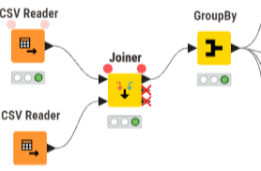
KNIME provides a visual audit trail of each workflow, making it easy to see exactly how our data moves from one step to the next. Each node represents a specific action from reading files, applying formulas, grouping, joining, or exporting. We can see the connections between them, showing a full path the data takes. This visual layout makes troubleshooting simple, since errors can be traced directly to the node where they occur.
Using KNIME makes it easy to bring multiple datasets together through a friendly drag-and-drop interface. Using nodes like CSV Reader to import data and Joiner to merge files, users can combine information from different sources without writing complex code. The GroupBy node then organizes the combined data into meaningful categories, setting it up for further analysis and reporting, like a Pivotable.
Once data is joined and grouped in KNIME, it can be turned into visuals like bar charts directly within the workflow, making patterns and trends easy to see. The grouped results can also be exported as a CSV file using the CSV Writer node. This allows us to view clean and summarized data to be shared or used in other tools. The workflows from our raw input to charts and exporting, shows how KNIME streamlines the analysis process in one place.